
Expert Knowledge
On-Premise InfoPath Alternative 2026: 5 Tools Compared
Looking for an on-premise InfoPath alternative? How Power Apps, Microsoft Forms, SharePoint forms, Nintex K2 and skybow Studio compare for SharePoint Server.

Sarah Winzer

If you're looking for an InfoPath alternative that runs on SharePoint Server, on your own infrastructure, most of the retirement advice you'll find doesn't actually apply to you. Almost all of it assumes the same thing: that you can move to the cloud.
That's a fair assumption for a lot of organizations, and Power Apps genuinely is Microsoft's strongest answer if the cloud is where you're headed.
But you might be on-premise for a reason: a regulated industry, a government requirement, data that legally has to stay on your own servers.
If that's you, the standard advice doesn't apply.
This post walks through why the usual "just move to Power Apps" advice breaks down on-premise, which of the commonly suggested InfoPath alternatives actually still work there, and what's left once you've ruled the rest out.
If cloud is genuinely on the table for you, we've already covered that full comparison elsewhere: Replace InfoPath 2026: Low-Code SharePoint Guide. This post is for everyone else.
Prefer to watch it instead? Sarah from skybow covers the same ground on video:
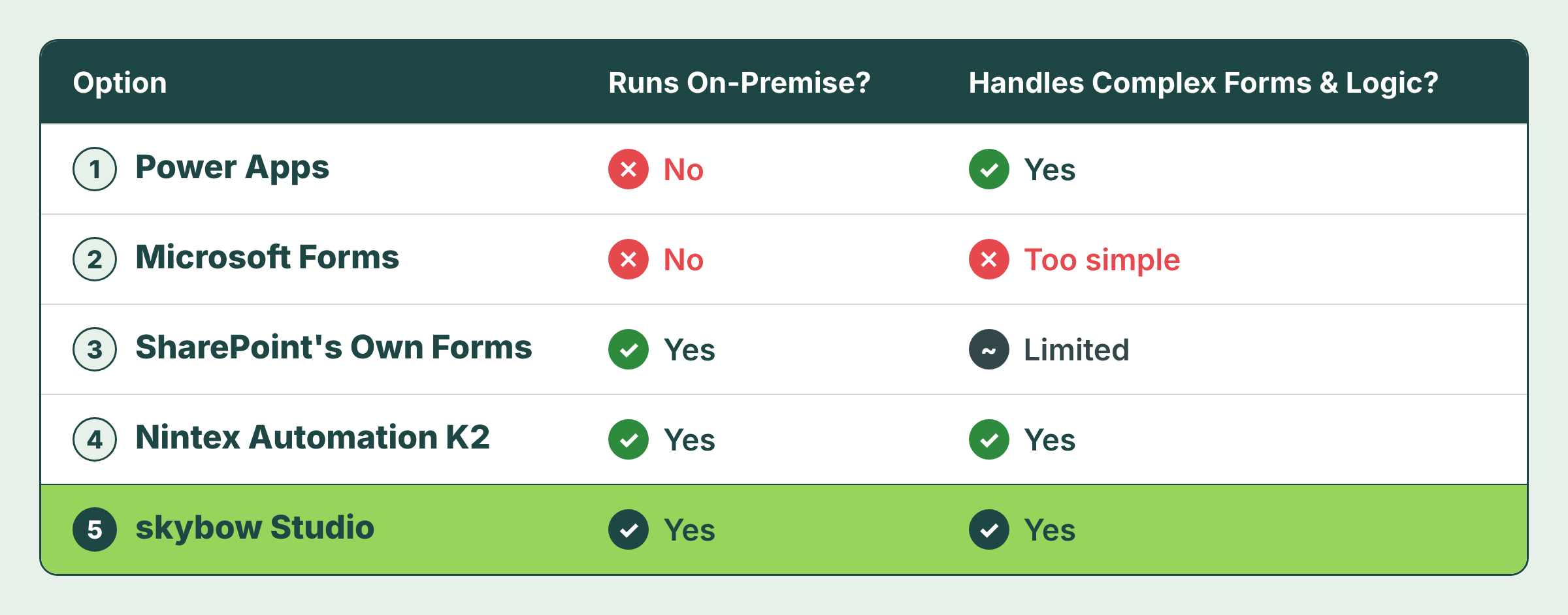
Here's how the five most commonly suggested InfoPath alternatives actually hold up when you have to stay on-premise, one by one:
Option 1: Power Apps
Power Apps is Microsoft's default answer to almost everything, and it's a genuinely capable platform. It's also built around Dataverse, and both live in Microsoft's cloud. There's no self-hosted version and no offline deployment. Whatever you build in Power Apps runs on Microsoft's servers, not yours.
The on-premises data gateway is where this gets confusing, because the name suggests more than it delivers. It lets a cloud-hosted Power App read data from your on-prem systems. But it doesn't move the app itself on-premise. The logic, the hosting, and the runtime all still sit in the cloud. For regulated or sensitive data, that's not a minor detail: the app still reaches out to your systems from outside them, every time it runs.
And even where the cloud is allowed, InfoPath doesn't move over cleanly either way. Every form gets rebuilt from scratch, and any logic that used to be a simple InfoPath rule now has to be written in Power FX, Microsoft's formula language, which your form builders probably don't know yet.
Option 2: Microsoft Forms
Microsoft Forms is free, fast, and cloud-only, and for a five-question survey, it's a genuinely good tool. It isn't a replacement for what InfoPath did. Branching only runs forward, one question to the next, with no repeating sections and no way to combine several conditions into one rule. A form with any real business logic behind it, an approval chain, a validation rule, a repeating line-item table, outgrows Microsoft Forms almost immediately.
Option 3: SharePoint's Own Forms
SharePoint list and library forms exist on both SharePoint Online and SharePoint Server, so at least they're genuinely on-premise. They just weren't built to carry InfoPath's complexity. Conditional logic beyond the basics, validation rules, and repeating sections all hit the same wall: you either bolt on JSON formatting and hope your team can maintain it, or you bring in another tool to do the job InfoPath already did.
Option 4: Nintex Automation K2
K2 Five is now sold as Nintex Automation K2, and it's a genuine option if you're staying on your own servers.
But it's a separate platform: you'd be standing it up and governing it on top of SharePoint, not inside it, for a job SharePoint used to handle on its own. If all you need is to replace InfoPath forms, that's usually more platform than the job calls for.
One more thing worth knowing: "Nintex for SharePoint" is a different, older product, built on SharePoint's own legacy workflow engine. Nintex has already set an end-of-life timeline for that engine, but don't assume the same date applies here; confirm it directly with Nintex.
Option 5: Rebuilding Natively in SharePoint with skybow Studio
Here's what all four options above have in common: none of them is a one-to-one home for what InfoPath actually was, a form builder that lived inside SharePoint itself. Your InfoPath data already lives in SharePoint, on-premise or online. Rebuilding the forms in SharePoint, rather than moving them to a new platform, is the more natural move: no new data layer, no formula language to learn, no extra platform to govern on top of what you already run.
This is where skybow Studio fits as an on-premise InfoPath alternative. It runs natively on SharePoint Server SE, 2019, Online, and hybrid environments, so your forms, logic, and automations stay inside the SharePoint you already have, under the permissions you've already set up.
Here's how all five InfoPath alternatives stack up, side by side:
skybow Studio vs. Nintex Automation K2
Once Power Apps, Microsoft Forms, and native SharePoint forms are off the table, the real on-premise decision comes down to these two.
See our full skybow vs Nintex comparison for the complete breakdown.
The difference starts with where each one actually lives:
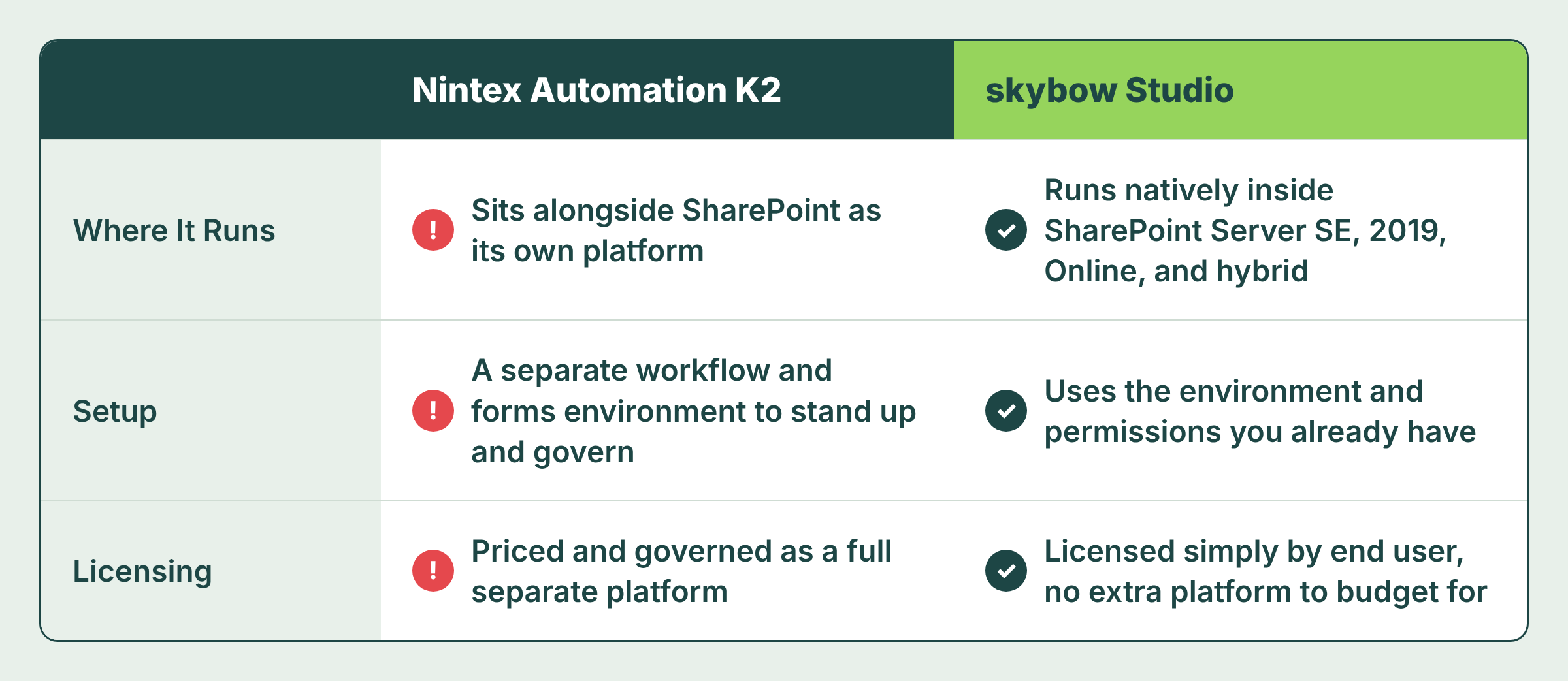
Nintex Automation K2 sits alongside SharePoint as its own platform. That means standing up and governing a separate workflow and forms environment, priced and licensed as its own product on top of everything SharePoint already gives you.
skybow Studio runs natively inside SharePoint Server SE, 2019, Online, and hybrid, so it uses the environment and permissions you already have instead of adding a new one.
The difference also shows up in what you pay for. Nintex Automation K2 is priced and governed as a full separate platform; skybow Studio is licensed simply by end user, with no separate platform to budget for on top of it.
Here's the same comparison, side by side:
Four Things to Do Before You Choose an InfoPath Alternative
- Conduct an inventory of all on-premise InfoPath forms. A migration cannot be planned for forms whose existence remains undocumented.
- Prioritize compliance-critical forms for early, careful replacement. These carry the greatest risk and should be addressed before any other migration work begins.
- Determine whether the on-premise requirement is genuine. Establish whether remaining on-premise reflects an actual regulatory or technical constraint, or simply a convention that has not been reexamined.
- Undertake a pilot rebuild of a single representative form. Direct experience with one form yields more reliable insight into effort and fit than any comparative analysis, including the one presented here.
Still On-Premise? That's Not a Dead End
If you remain on-premise, most standard InfoPath guidance was never written with your circumstances in mind. This is not an indication that you are behind. It is an indication that the guidance itself was incomplete.
Book a free call and we'll look at your InfoPath forms, on-premise, online, or hybrid, and tell you honestly what it'll take to move them.
You want to create your next SharePoint project faster and easier with low-code?
Read more

Let's talk about your workflows
We know the feeling of wanting to get started straight away. Let's create the perfect set-up together.
Ads
Ad-1

Ad-2

Ad-3

Ad-4

Ad-5

Ad-6
